

FAQ

Table of content
Setup
Q1. How can I setup my units ?
Q2. I cannot find the QR Code for setup.
Q3. App says "waiting for approval".
Q4. I don't know/forgot the device password.
Q5. I cannot find the Wi-Fi button on my remote control.
Q6. My Wi-Fi router supports only 5GHz band SSID.
Q7. I want to reset the Wi-Fi setting.
Q8. How can I add users ?
Connection
Q9. After replacing the Wi-Fi router, I cannot control my units.
Q10. Connection between air conditioner and router is frequently lost.
Error
Q11. E04-0144-9001 error
Q12. E03-0037-5002 / E03-0037-5005 error
Q13. E03-0091-4304 error
Function
Q14. Why do I see minor consumptions in the statistics chart?
Q1. How can I setup my units ?
To check the setup method of your unit, see our setup guide.
Q2. I cannot find the QR Code for setup.
The setup process varies by model. Please lift the front panel of your indoor unit to check for a QR code.
① If there is a QR code, scan it.
② If there is no QR code, refer to our setup guide here.


Q3. App says "waiting for approval".
The owner of the device (the user who first registered the device) must approve the second user. Please wait for approval.
If the original owner cannot be contacted or has left the service, you will need to reset the air conditioner's settings. Once this is done, you can register it again as the new owner.
Q4. I don't know/forgot the device password.
If you forgot the device password, please refer to our guide on how to reset the Wi-Fi settings.
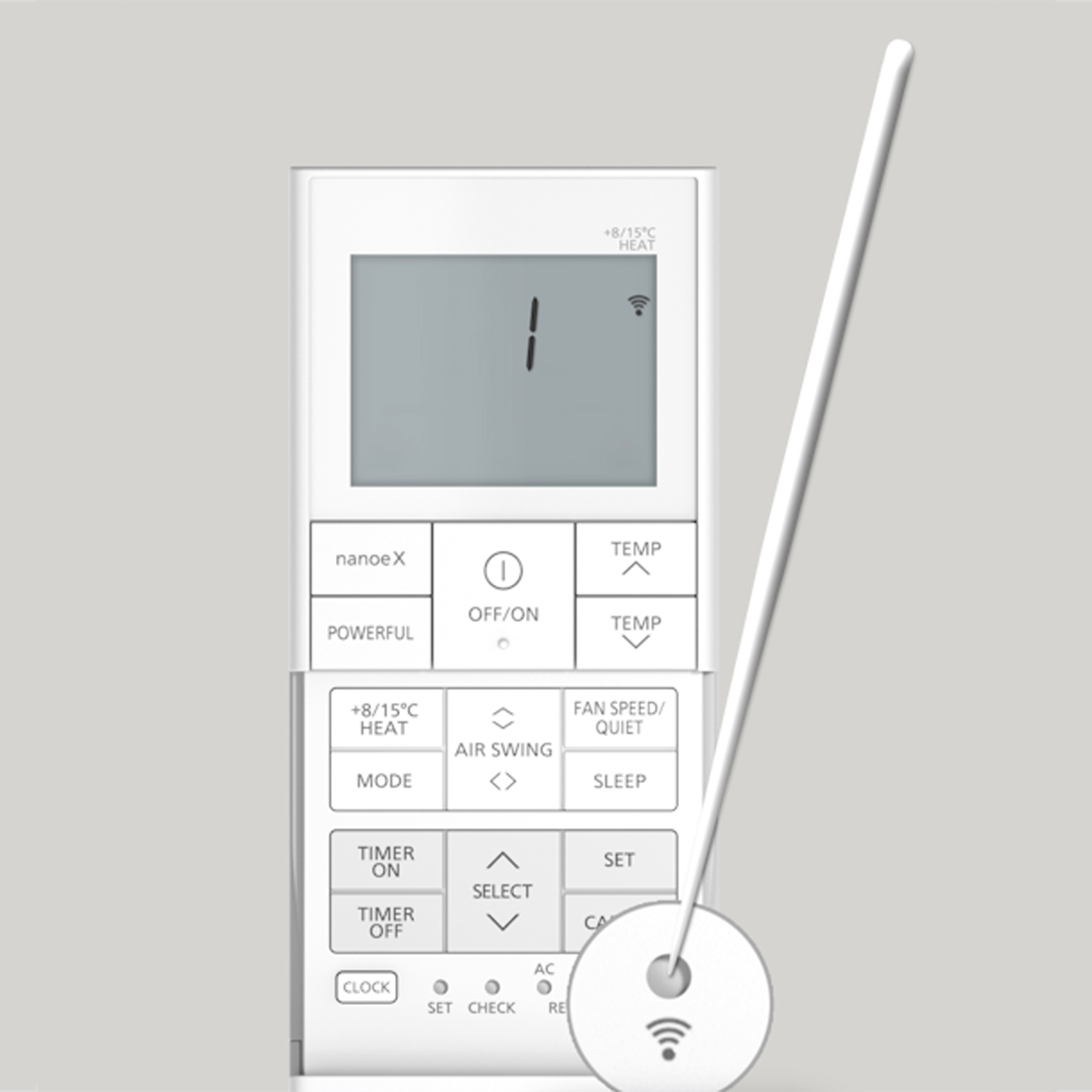
Q5. I cannot find the Wi-Fi button on my remote control.
The location of the Wi-Fi button varies by model. Look for a small hole with a Wi-Fi mark on your remote. To activate the air conditioner's Wi-Fi, press this button with the tip of a thin pin.
Remote control design varies by model. The image is for illustration purposes only.
Q6. My Wi-Fi router supports only 5GHz band SSID.
A 2.4 GHz band Wi-Fi network is required to connect the air conditioner to the router. If your router supports 2.4 GHz or 5 GHz band with one SSID, you may be able to use the 2.4 GHz band by turning off the router's steering function.
*For some air conditioner, you can proceed with device registration even when the steering function is on.
*For more information about router features, contact your Internet Service Provider.
Q7. I want to reset the Wi-Fi setting.
To reset the Wi-Fi settings of your device, refer to our guide.
Q8. How can I add users ?
To add the additional users, refer to our guide.
Q9. After replacing the Wi-Fi router, I cannot control my units.
When you replace your Wi-Fi router (SSID and password are changed), refer to our guide to update the settings.
Q10. Connection between air conditioner and router is frequently lost.
If the connection between your air conditioner and router is frequently lost, please check if the 2.4GHz band Wi-Fi around the air conditioner is stable.
If your router has a band steering function that frequently switches between the 2.4GHz and 5GHz bands, this might cause the connection between the air conditioner and router to be lost. Please ensure that this function is disabled.
If the issue persists, contact the local Panasonic support.
Q11. E04-0144-9001 error
Our app uses an internet browser to login. Depending on your browser, an error may occur. Change the default browser of your smartphone or tablet to the recommended browser below and try again.
Supported browser
iOS: Safari
Android: Chrome
If you are an Android user, please follow the steps below to disable the automatic translation function in Chrome.
1) On your Android phone or tablet, open the Chrome app.
2) Go to the right of the address bar, tap "…" > Settings.
3) Tap "Languages".
4) Under "Translation settings", turn OFF "Offer to send pages in other languages to Google translate".
Q12. E03-0037-5002 / E03-0037-5005 error
If you receive this error, please check if the Internet environment is stable. If the problem persists even though the Internet is stable, contact your local service center here.
Q13. The app displays E03-0091-4304.
This error occurs when the password you've entered does not match the one set by the owner. Ask the owner for the correct device password. If you cannot contact the owner, you will need to reset the device. Refer to our guide.
Q14. Why do I see minor consumptions in the statistics chart?
The small consumptions are related to standby energy of the device.