

FAQ

Table of content
Setup
Q1. How can I setup my units ?
Q2. I cannot find the QR Code for setup.
Q3. App says "waiting for approval".
Q4. I don't know/forgot the device password.
Q5. I cannot find the Wi-Fi button on the wireless remote controller.
Q6. My Wi-Fi router supports only 5GHz band SSID.
Q7. I want to reset the Wi-Fi setting.
Q8. How can I add users ?
Connection
Q9. After replacing the Wi-Fi router, I cannot control my units.
Q10. Connection between air conditioner and router is frequently lost.
Error
Q11. E04-0144-9001 error
Q12. E03-0037-5002 / E03-0037-5005 error
Q13. E03-0091-4304 error
Function
Q14. Why do I see minor consumptions in the statistics chart?
Q15. What kind of function can be operated by Amazon Alexa or Google Home?
Q16. What is the ECO Setting of AQUAREA?
Q17. What is the Comfort Setting of AQUAREA?
Q18. What if the AQUAREA temperature setting is changed after ECO/Comfort setting set in the app?
Q19. I cannot activate AQUAREA Holiday Timer via app.
Q20. Why does the AQUAREA's energy consumption displayed on the remote differ from the one shown in the app?
Q1. How can I setup my units ?
To check the setup method of your unit, see our setup guide.
Q2. I cannot find the QR Code for setup.
The setup process varies by model. Please lift the front panel of your indoor unit to check for a QR code.
① If there is a QR code, scan it.
② If there is no QR code, refer to our setup guide here.


Q3. App says "waiting for approval".
The owner of the device (the user who first registered the device) must approve the second user. Please wait for approval.
If the original owner cannot be contacted or has left the service, you will need to reset the air conditioner's settings. Once this is done, you can register it again as the new owner.
Q4. I don't know/forgot the device password.
If you forgot the device password, please refer to our guide on how to reset the Wi-Fi settings.
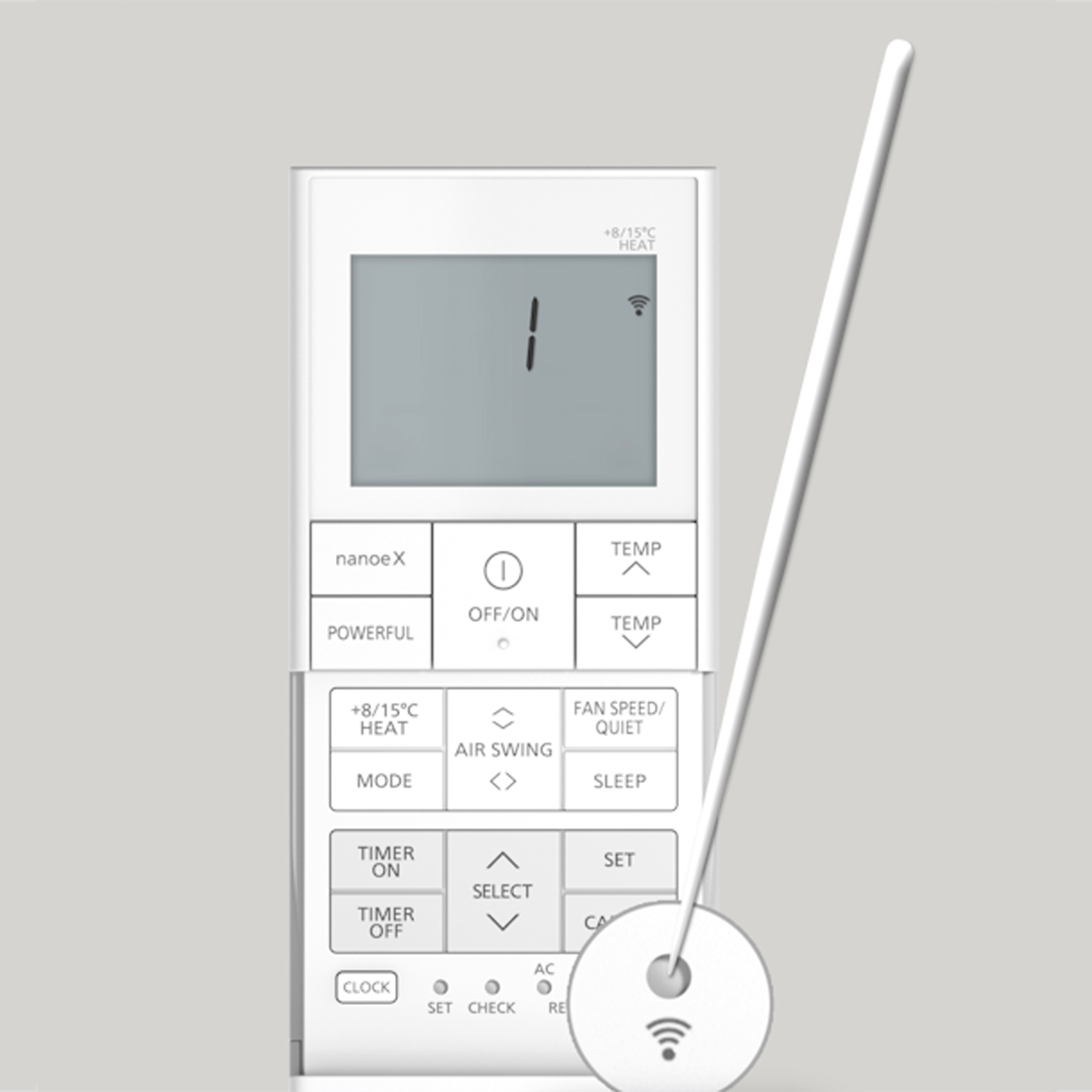
Q5. I cannot find the Wi-Fi button on the wireless remote controller.
The location of the Wi-Fi button varies by model. Look for a small hole with a Wi-Fi mark on your remote. To activate the air conditioner's Wi-Fi, press this button with the tip of a thin pin.
Remote control design varies by model. The image is for illustration purposes only.
Q6. My Wi-Fi router supports only 5GHz band SSID.
To contact your Internet Service Provider (ISP) for assistance in separating the 2.4GHz and 5GHz networks. Our Panasonic unit’s Wi-Fi module requires the 2.4GHz band to register and function correctly. It will operate intermittently on a router configured in “Mixed Band” or “Steering” mode.
Q7. I want to reset the Wi-Fi setting.
To reset the Wi-Fi settings of your device, refer to our guide.
Q8. How can I add users ?
To add the additional users, refer to our guide.
Q9. After replacing the Wi-Fi router, I cannot control my units.
When you replace your Wi-Fi router (SSID and password are changed), refer to our guide to update the settings.
Q10. Connection between air conditioner and router is frequently lost.
If the connection between your air conditioner and router is frequently lost, please check if the 2.4GHz band Wi-Fi around the air conditioner is stable.
If your router has a band steering function that frequently switches between the 2.4GHz and 5GHz bands, this might cause the connection between the air conditioner and router to be lost. Please ensure that this function is disabled.
If the issue persists, contact the local Panasonic support.
Q11. E04-0144-9001 error
Our app uses an internet browser to login. Depending on your browser, an error may occur. Change the default browser of your smartphone or tablet to the recommended browser below and try again.
Supported browser
iOS: Safari
Android: Chrome
If you are an Android user, please follow the steps below to disable the automatic translation function in Chrome.
1) On your Android phone or tablet, open the Chrome app.
2) Go to the right of the address bar, tap "…" > Settings.
3) Tap "Languages".
4) Under "Translation settings", turn OFF "Offer to send pages in other languages to Google translate".
Q12. E03-0037-5002 / E03-0037-5005 error
If you receive this error, please check if the Internet environment is stable. If the problem persists even though the Internet is stable, contact your local service center here.
Q13. The app displays E03-0091-4304.
This error occurs when the password you've entered does not match the one set by the owner. Ask the owner for the correct device password. If you cannot contact the owner, you will need to reset the device. Refer to our guide.
Q14. Why do I see minor consumptions in the statistics chart?
The small consumptions are related to standby energy of the device.
Q15. What kind of function can be operated by Amazon Alexa or Google Home?
Below functions can be operated by Alexa and Google Home.
Operation ON/OFF
Change the operating mode
Change the temperature
Change the operating mode and temperature
Check the status
Q16. What is the ECO Setting of AQUAREA?
This is a function to preset room temperature of each cooling & heating zone and shift amount of hot water temperature to reduce power consumption of AQUAREA.
Q17. What is the Comfort Setting of AQUAREA?
This is a function to preset room temperature of each cooling & heating zone and shift amount of hot water temperature to increase comfort of cooling & heating of AQUAREA.
Q18. What if the AQUAREA temperature setting is changed after ECO/Comfort setting set in the app?
If you change the temperature setting using the remote controller after setting the ECO or Comfort setting in the app, the temperature setting from the remote controller takes priority and the ECO or Comfort setting is not cancelled. Then, when the ECO setting or Comfort setting is cancelled, the room temperature and hot water temperature of each heating and cooling zone is returned as shift amount.
Q19. I cannot activate AQUAREA Holiday Timer via app.
In order to activate AQUAREA Holiday Timer via App, Start and End time should be previously set in the remote controller. Please refer to Unit model to check how to apply these times.
Q20. Why does the AQUAREA's energy consumption displayed on the remote differ from the one shown in the app?
The energy consumption values are calculated independently by the two devices: the Remote Controller and the Cloud Adapter. Because of this independent calculation, there might be differences in the displayed values.
Per example, if there's an internet blackout lasting 8 hours, the Cloud Adapter won't cummulate energy consumption during that period since it relies on the internet. However, the remote, which operates without internet dependency, will continue to cummulate consumption even during the internet blackout.